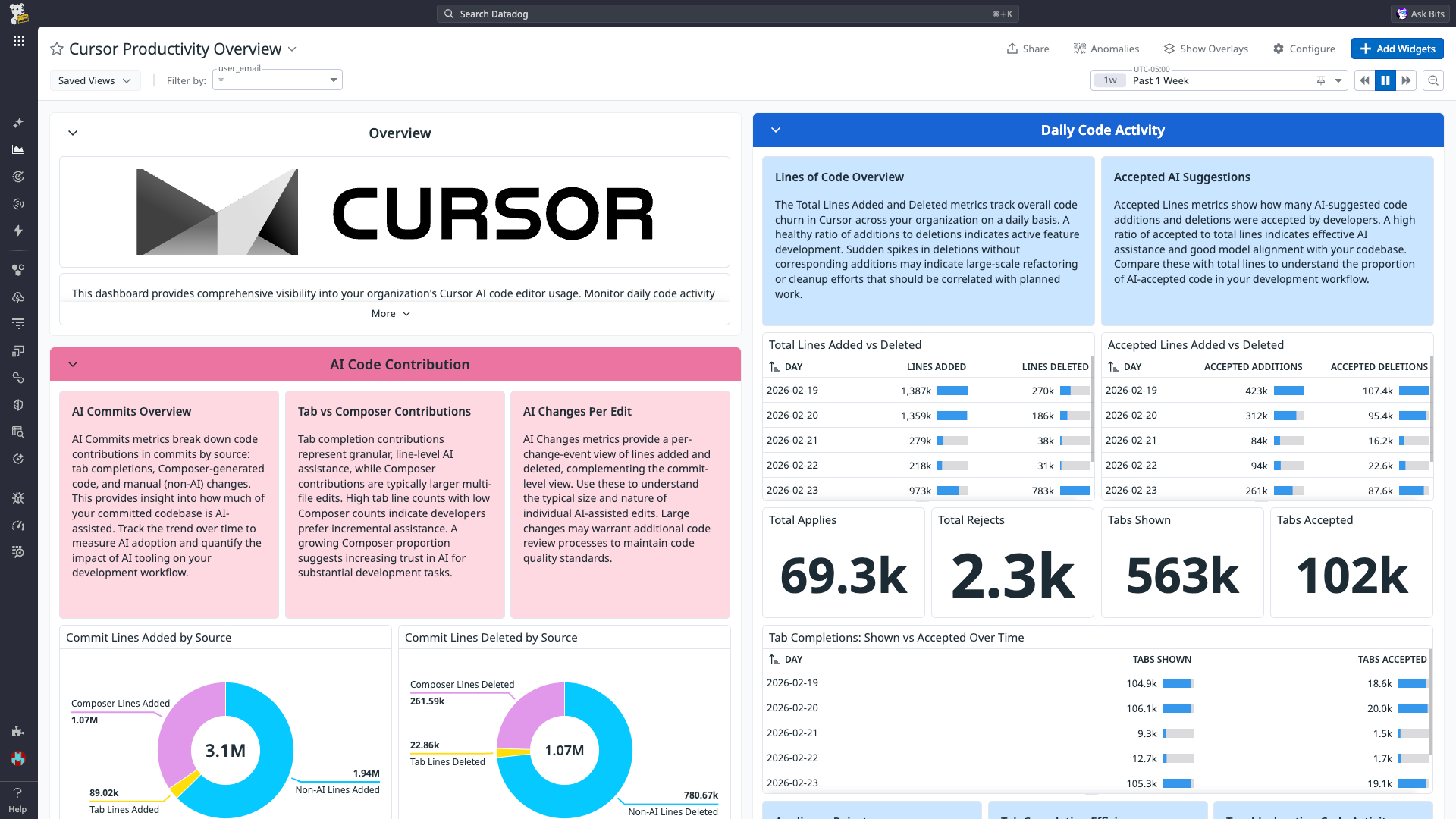
cursor.daily_usage.total_lines_added
(gauge) | Total number of lines added in a day.
Shown as unit |
cursor.daily_usage.total_lines_deleted
(gauge) | Total number of lines deleted in a day.
Shown as unit |
cursor.daily_usage.accepted_lines_added
(gauge) | Total number of suggested line additions accepted in a day.
Shown as unit |
cursor.daily_usage.accepted_lines_deleted
(gauge) | Total number of suggested line deletions accepted in a day.
Shown as unit |
cursor.daily_usage.total_applies
(gauge) | Total number of code change suggestions accepted in a day.
Shown as unit |
cursor.daily_usage.total_rejects
(gauge) | Total number of code change suggestions rejected in a day.
Shown as unit |
cursor.daily_usage.total_tabs_shown
(gauge) | Total number of autocomplete suggestions shown in a day.
Shown as unit |
cursor.daily_usage.total_tabs_accepted
(gauge) | Total number of autocomplete suggestions accepted in a day.
Shown as unit |
cursor.daily_usage.composer_requests
(gauge) | Total number of composer requests made in a day.
Shown as unit |
cursor.daily_usage.bugbot_usages
(gauge) | Total number of bugbot usages in a day.
Shown as unit |
cursor.daily_usage.chat_requests
(gauge) | Total number of chat requests made in a day.
Shown as request |
cursor.daily_usage.agent_requests
(gauge) | Total number of agent requests made in a day.
Shown as request |
cursor.daily_usage.cmdk_usages
(gauge) | Total number of inline edit prompt bar calls in a day.
Shown as unit |
cursor.daily_usage.subscription_included_requests
(gauge) | Total number of subscription included requests made in a day.
Shown as request |
cursor.daily_usage.api_key_requests
(gauge) | Total number of API key requests made in a day.
Shown as request |
cursor.daily_usage.usage_based_requests
(gauge) | Total number of usage based requests made in a day.
Shown as request |
cursor.spending.spend_cents
(gauge) | Total number of cents spent.
Shown as cent |
cursor.spending.fast_premium_requests
(gauge) | Total number of fast premium requests made.
Shown as request |
cursor.usage_events.input_tokens
(count) | Total number of input tokens used for a session.
Shown as unit |
cursor.usage_events.output_tokens
(count) | Total number of output tokens used for a session.
Shown as unit |
cursor.usage_events.cache_write_tokens
(count) | Total number of cache write tokens used for a session.
Shown as unit |
cursor.usage_events.cache_read_tokens
(count) | Total number of cache read tokens used for a session.
Shown as unit |
cursor.usage_events.total_cents
(count) | Total number of cents spent for a session.
Shown as cent |
cursor.ai_commits.tab_lines_added
(count) | Total number of lines added using tab completion in a commit.
Shown as unit |
cursor.ai_commits.tab_lines_deleted
(count) | Total number of lines deleted using tab completion in a commit.
Shown as unit |
cursor.ai_commits.composer_lines_added
(count) | Total number of lines added using the Composer in a commit.
Shown as unit |
cursor.ai_commits.composer_lines_deleted
(count) | Total number of lines deleted using the Composer in a commit.
Shown as unit |
cursor.ai_commits.non_ai_lines_added
(count) | Total number of lines added without AI assistance in a commit.
Shown as unit |
cursor.ai_commits.non_ai_lines_deleted
(count) | Total number of lines deleted without AI assistance in a commit.
Shown as unit |
cursor.ai_changes.lines_added
(count) | Total number of lines added in a specific code change.
Shown as unit |
cursor.ai_changes.lines_deleted
(count) | Total number of lines deleted in a specific code change.
Shown as unit |